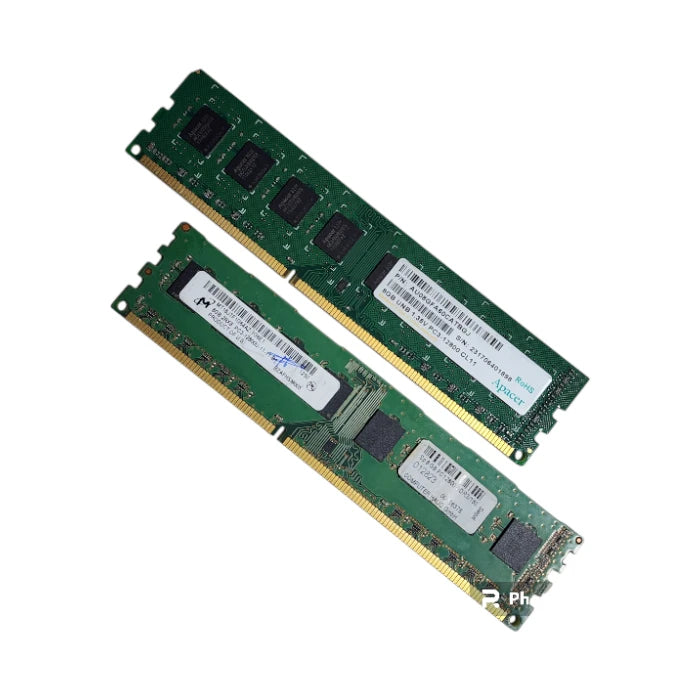
DDR3 RAM, 8GB , PC3-12800, 1600MHz, Desktop Memory,UDIMM, Non-ECC RAM, Apacer RAM, Micron RAM, Bundle,CL11 RAM, PC Upgrade, Desktop RAM
DDR3 RAM, 8GB , PC3-12800, 1600MHz, Desktop Memory,UDIMM, Non-ECC RAM, Apacer RAM, Micron RAM, Bundle,CL11 RAM, PC Upgrade, Desktop RAM
Here’s what those stickers/markings are telling you (and what it means for compatibility).
Stick 1 (Apacer)
P/N: AU08GFA60CATBGJ (Apacer 8GB DDR3 module)
Capacity: 8GB
Type / pins: DDR3 UDIMM (desktop) 240-pin, Unbuffered (“UNB”)
Speed grade: PC3-12800 = DDR3-1600 (1600 MT/s)
Voltage: marked 1.35V (DDR3L / low-voltage)
Latency: CL11
RoHS: environmental compliance marking (not a performance spec)
Stick 2 (Micron, bundled with it)
Model: MT16JTF1G64AZ-1G6E1
This is a Micron 8GB DDR3-1600 UDIMM (PC3-12800U), typically dual-rank x8 (2Rx8) and unbuffered.
What “bundle with … MT16JTF…” means in practice
You likely have two different 8GB desktop sticks:
1× Apacer 8GB DDR3-1600 UDIMM (DDR3L 1.35V)
1× Micron 8GB DDR3-1600 UDIMM (often standard DDR3 voltage)
That usually works together if your motherboard supports standard DDR3 operation, because DDR3L (1.35V) sticks are commonly designed to also run at 1.5V when mixed. The main failure case is when the system requires DDR3L-only (rare on desktops, more common on some small form-factor/OEM systems).
Quick compatibility checklist (so you don’t get surprised)
Your system must support:
DDR3 (not DDR4/DDR5)
240-pin UDIMM, non-ECC, unbuffered (not SO-DIMM, not ECC RDIMM)
Ideally DDR3-1600 / PC3-12800 (it can downclock if needed)
If you tell me your PC/motherboard model (or CPU + motherboard), I can say definitively whether mixing these two is safe and what speed they’ll likely run at.
Product features
Product features
Materials and care
Materials and care
Merchandising tips
Merchandising tips
Share